

We have modified the IPPS MS-DRG Batch Grouper instruction and sample files to improve formatting, labeling, and data clarity.
These updates align with MediRegs branding standards and reflect terminology used in the calculator UI.
Please use the revised instruction and sample files for all future Batch Grouper uploads to prevent file errors and ensure consistency with the tool's input.
What's changed:
Instruction files feature consistent fonts, spacing, color styling, and layout for better readability.
Field names and instructional text are revised for accuracy, clarity, and alignment with UI labels.
Sample (ICD-10 and ICD-9) and empty batch files are updated to reflect these instruction changes for a smoother upload experience.
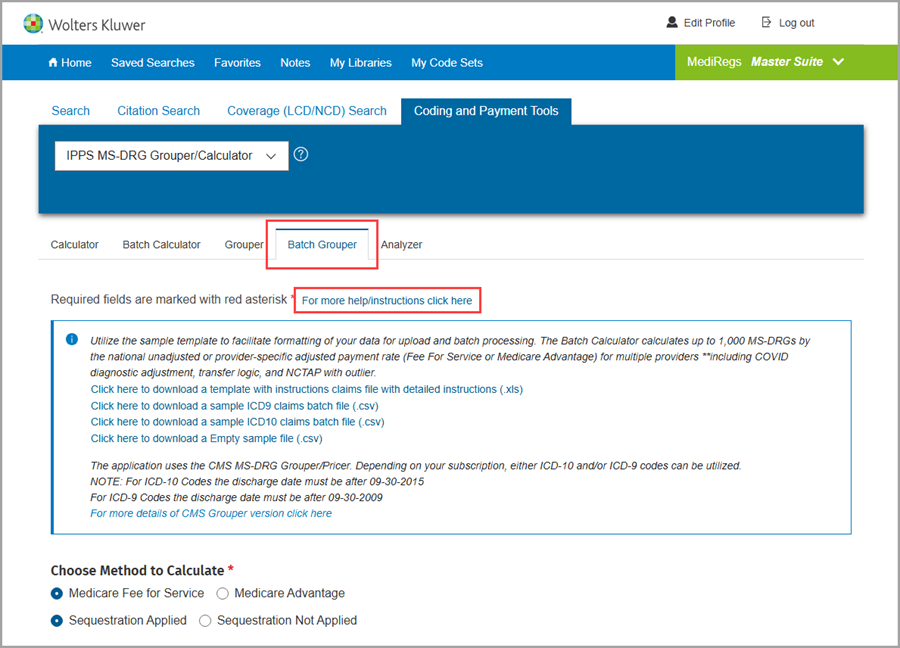
You can find these files in the Coding and Payment Tools section, under the IPPS MS-DRG Grouper/Calculator page, in the Batch Grouper tab. From there, click the “For more help/instructions click here” link to open the instructional box containing the file download links labeled “Click here to download…”
For training and support, visit: MediRegs Training & Recordings. Questions or feedback? Contact us at supportcenter@mediregs.com or 800-808-6800.